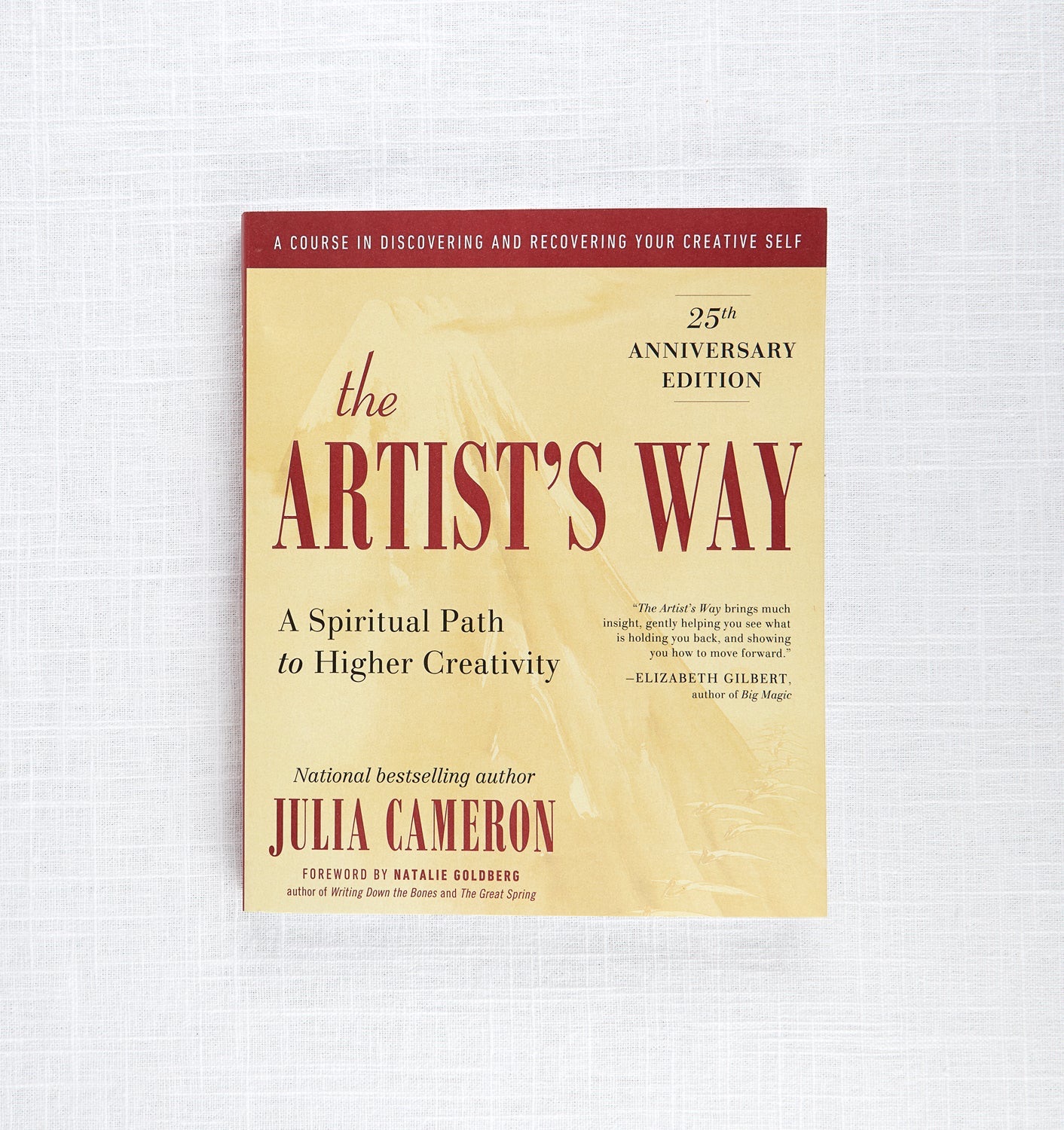
Julia Cameron says write three pages by hand every morning before you do anything else.
If you’ve never heard of morning pages, it’s an exercise from her book The Artist’s Way, designed specifically for creatives who’ve lost their relationship to their craft. (That’s me🙋♂️)
How it works
Basically you write, stream of consciousness, first thing in the morning, before your brain has a chance to filter itself.
You write whatever’s in your head.
- the grocery list
- the thing you’re anxious about
- the resentment you’ve been carrying around
- the half-formed idea that disappeared by 9am yesterday
All of it.
Cameron calls what you’re writing through “the censor” – the internal filter you have that stops you from saying what you’re really thinking.
In her words:
(Add quote about morning pages)
The morning pages aren’t trying to produce anything “good” or “viral-worthy” per se.. the goal is to massage the knots out of your creative self, to get past that censor.
I needed this more than I realized.
I spent the last five years building my own business.
And somewhere in the middle of all of it..
The product decisions, managing clients, the constant output.. I lost touch with the part of myself that was just a creative dude.
Not a founder, not a builder.
Just someone who likes to make cool sh*t.
I stopped dancing unapologetically.
Stopped writing.
Stopped making videos.
I stopped creating for the sake of creation because I started treating it like a business.
Which was great. I learned a lot.
But I lost a lot of myself in the process.
Morning pages is one of the few practices that’s actually helped me find my way back to me.
I’ve also been wanting to write online for a while; actually publish my thinking instead of just hoarding it privately.
But you can’t write well from a cluttered head.
The morning pages became the foundation for that too.
The exercise is straightforward:
- you sit down
- you write stream of consciousness
- you don’t stop until you’ve reached the end of the page
The point isn’t the writing.
The point is to get the mental clutter out first thing so there’s actual room for something creative during the rest of the day.
It’s suggested you do this with the OG pen and paper.
For the first few sessions, it felt right for me.
But when I’d actually write some meaningful stuff in there and it would just sit in the notebook. Disconnected from everything else.
No way to link it, build on it, turn it into anything.
See, I come from using Obsidian as my second brain. It’s my non linear note-taking tool that works with my ADHD.
It’s how I manage all my personal knowledge.
Every project, every note, every half-finished thought lives there and connects to everything else.
I needed morning pages inside the system where my thinking actually happens.
So I built it.
What I Built
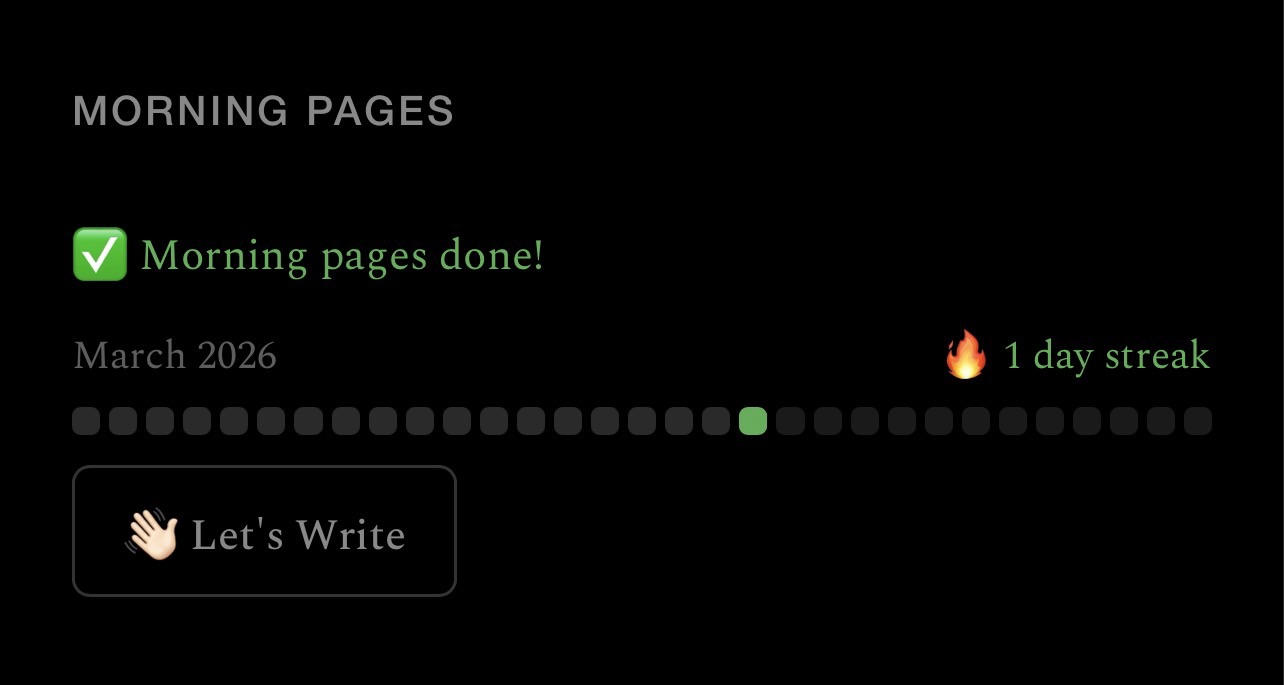
Here’s what the system does:
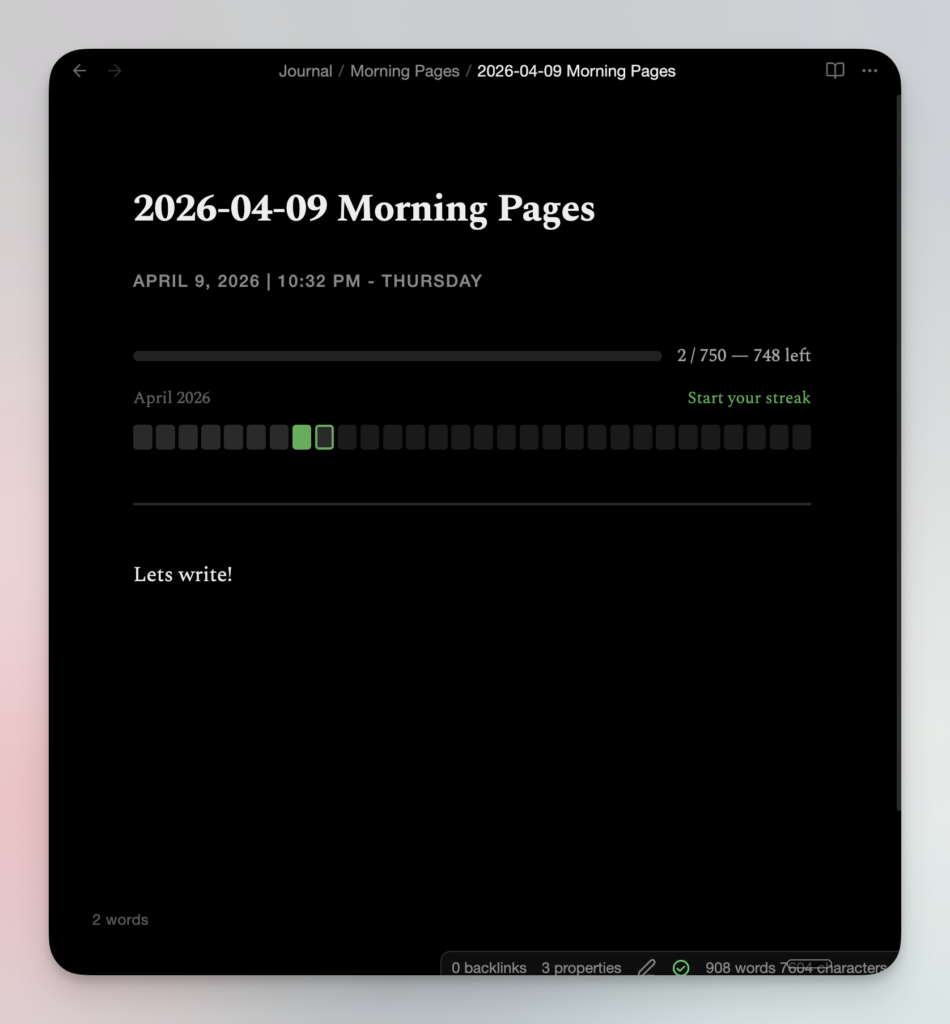
- A button on your daily note that opens today’s morning pages — or creates it if it doesn’t exist yet
- A 750-word progress bar that only tracks what you write below the divider line (not the template, not the metadata)
- A fixed word count pill in the bottom-left corner that follows you as you scroll
- A monthly streak grid — one square per day, filled green when you hit 750 words, clickable to reopen any past entry
- A celebration screen with confetti when you hit the goal — then it disappears on its own
The whole thing lives inside Obsidian.
How to set this up yourself
What You’ll Need
Install these three community plugins before you start:
- Templater – handles template rendering and the button logic
- QuickAdd – creates new notes from templates via command
- Dataview – the engine behind the streak grid and progress bar (enable DataviewJS in settings)
All three are free and widely used. If you’re already using Obsidian seriously, you probably have at least two of them.
If you use Claude Code:
I put together a complete setup prompt that does all of this automatically; folder structure, template, QuickAdd config, daily note block, everything. One paste, five minutes. I’m sending it to my email list. [Subscribe here to grab it.]
Step 1: Create the Folder Structure
Create these two folders in your vault if they don’t already exist:
Templates/
Journal/Morning Pages/Your morning pages notes will live in Journal/Morning Pages/. The template lives in Templates/.
Step 2: Create the Morning Pages Template
Create a file at Templates/Morning Pages Template.md with this exact content:
---
type: morning-pages
date: <% tp.date.now("YYYY-MM-DD") %>
tags:
- morning-pages
---
#### <% tp.date.now("MMMM D, YYYY") %> | <% tp.date.now("hh:mm A") %> - <% tp.date.now("dddd") %>
```dataviewjs
const folder = "Journal/Morning Pages";
const today = moment();
const monthStr = today.format("YYYY-MM");
const todayStr = today.format("YYYY-MM-DD");
const daysInMonth = today.daysInMonth();
const pages = dv.pages(`"${folder}"`).where(p => p.file.name.startsWith(monthStr)).array();
const completedDates = new Set();
for (const page of pages) {
const c = await dv.io.load(page.file.path);
const sep = c.lastIndexOf("n---n");
const writing = sep !== -1 ? c.slice(sep + 5) : "";
const words = writing.trim() === "" ? 0 : writing.trim().split(/s+/).length;
if (words >= 750) completedDates.add(page.file.name.substring(0, 10));
}
let streak = 0;
let check = today.clone();
while (completedDates.has(check.format("YYYY-MM-DD"))) {
streak++;
check.subtract(1, "day");
}
const thisContent = await dv.io.load(dv.current().file.path);
const thisSep = thisContent.lastIndexOf("n---n");
const thisWriting = thisSep !== -1 ? thisContent.slice(thisSep + 5) : "";
const words = thisWriting.trim() === "" ? 0 : thisWriting.trim().split(/s+/).length;
const goal = 750;
const pct = Math.min(100, Math.floor((words / goal) * 100));
const status = words >= goal ? "🎉 Done!" : `${goal - words} left`;
const wrap = dv.el("div", "", { attr: { style: "display:flex; flex-direction:column; gap:10px;" } });
const barRow = wrap.createEl("div", { attr: { style: "display:flex; align-items:center; gap:12px;" } });
const track = barRow.createEl("div", { attr: { style: "flex:1; background:#222; border-radius:6px; height:8px; overflow:hidden;" } });
track.createEl("div", { attr: { style: `width:${pct}%; background:#4caf50; height:100%; border-radius:6px;` } });
barRow.createEl("span", { text: `${words} / ${goal} — ${status}`, attr: { style: "font-size:0.85em; white-space:nowrap; opacity:0.7;" } });
const calHeader = wrap.createEl("div", { attr: { style: "display:flex; justify-content:space-between; align-items:center;" } });
calHeader.createEl("span", { text: today.format("MMMM YYYY"), attr: { style: "font-size:0.8em; opacity:0.4;" } });
calHeader.createEl("span", { text: streak > 0 ? `🔥 ${streak} day streak` : "Start your streak", attr: { style: "font-size:0.8em; color:#4caf50;" } });
const existing = document.getElementById("mp-pill");
if (existing) existing.remove();
const pill = document.body.createEl("div", { attr: {
id: "mp-pill",
style: `position:fixed; bottom:44px; left:80px; z-index:9999; pointer-events:none;
color:rgba(255,255,255,0.35); font-size:0.8em; letter-spacing:0.03em;`
}});
pill.textContent = `${words} words`;
const cleanup = app.workspace.on("active-leaf-change", () => {
document.getElementById("mp-pill")?.remove();
document.getElementById("mp-celebrate")?.remove();
app.workspace.offref(cleanup);
});
const celebKey = `mp-celebrated-${dv.current().file.name}`;
if (words >= goal && !sessionStorage.getItem(celebKey)) {
sessionStorage.setItem(celebKey, "1");
const overlay = document.body.createEl("div", { attr: {
id: "mp-celebrate",
style: `position:fixed; inset:0; z-index:99999; background:rgba(0,0,0,0.92);
display:flex; flex-direction:column; align-items:center; justify-content:center;
cursor:pointer; animation:mp-fade 0.6s ease; overflow:hidden;`
}});
const celebStyle = document.head.createEl("style");
celebStyle.textContent = `
@keyframes mp-fade { from { opacity:0; } to { opacity:1; } }
@keyframes mp-float { 0%,100% { transform:translateY(0); } 50% { transform:translateY(-10px); } }
@keyframes mp-fall-a { 0%{transform:translateY(-10px) rotate(0deg);opacity:1} 100%{transform:translateY(110vh) rotate(400deg);opacity:0} }
@keyframes mp-fall-b { 0%{transform:translateY(-10px) rotate(0deg);opacity:1} 100%{transform:translateY(110vh) rotate(-300deg);opacity:0} }
@keyframes mp-fall-c { 0%{transform:translateY(-10px) rotate(0deg);opacity:1} 100%{transform:translateY(110vh) rotate(600deg);opacity:0} }
#mp-celebrate .mp-emoji { animation: mp-float 2s ease-in-out infinite; }
`;
const colors = ['#4caf50','#81c784','#a5d6a7','#ffeb3b','#ff9800','#2196f3','#e91e63','#fff'];
const anims = ['mp-fall-a','mp-fall-b','mp-fall-c'];
for (let i = 0; i < 90; i++) {
const size = 5 + Math.random() * 9;
overlay.createEl("div", { attr: { style:
`position:absolute; width:${size}px; height:${size}px;
background:${colors[Math.floor(Math.random() * colors.length)]};
border-radius:${Math.random() > 0.5 ? '50%' : '2px'};
left:${Math.random() * 100}%; top:0;
animation:${anims[Math.floor(Math.random() * 3)]} ${2 + Math.random() * 2.5}s ease-in ${Math.random() * 2}s both;`
}});
}
overlay.createEl("div", { text: "🌅", attr: { class: "mp-emoji", style: "font-size:4em; margin-bottom:20px; position:relative;" } });
overlay.createEl("div", { text: "750 words.", attr: { style: "font-size:2.2em; font-weight:600; color:#fff; margin-bottom:8px; position:relative;" } });
overlay.createEl("div", { text: "You showed up for yourself today.", attr: { style: "font-size:1em; color:rgba(255,255,255,0.4); margin-bottom:40px; position:relative;" } });
overlay.createEl("div", { text: "tap to continue", attr: { style: "font-size:0.75em; color:rgba(255,255,255,0.2); letter-spacing:0.1em; position:relative;" } });
overlay.addEventListener("click", () => overlay.remove());
setTimeout(() => overlay.remove(), 7000);
}
const grid = wrap.createEl("div", { attr: { style: "display:flex; gap:3px;" } });
for (let d = 1; d <= daysInMonth; d++) {
const ds = `${monthStr}-${String(d).padStart(2, "0")}`;
const done = completedDates.has(ds);
const isToday = ds === todayStr;
const future = moment(ds).isAfter(today, "day");
const noteName = `${ds} Morning Pages`;
const box = grid.createEl("div", { attr: { style:
`flex:1; height:20px; border-radius:3px; cursor:${future ? "default" : "pointer"};
border:2px solid ${done ? "#4caf50" : isToday ? "#4caf50" : "transparent"};
background:${done ? "#4caf50" : future ? "#1a1a1a" : "#2a2a2a"};`
}});
if (!future) {
box.addEventListener("click", () => app.workspace.openLinkText(noteName, folder, false));
}
}
```
---
The --- at the bottom of the template is the word count boundary. Everything you write below it counts toward 750. The DataviewJS block above it — the progress bar, the streak grid — doesn’t count.
Step 3: Add the Morning Pages QuickAdd Choice
Open .obsidian/plugins/quickadd/data.json and add this object as the first item in the choices array:
{
"id": "morning-pages",
"name": "Morning Pages",
"type": "Template",
"command": true,
"templatePath": "Templates/Morning Pages Template.md",
"fileNameFormat": {
"enabled": true,
"format": "Journal/Morning Pages/{{DATE:YYYY-MM-DD}} Morning Pages"
},
"folder": {
"enabled": true,
"folders": ["Journal/Morning Pages"],
"chooseWhenCreatingNote": false,
"createInSameFolderAsActiveFile": false
},
"appendLink": false,
"openFileInANewTab": { "enabled": false, "direction": "vertical", "focus": true },
"openFile": true,
"openFileInMode": "default",
"fileExistsMode": "Open existing file",
"setFileExistsBehavior": true
}The fileExistsMode: "Open existing file" is what prevents it from creating duplicate notes if you trigger it a second time the same day.
Step 4: Add the Button to Your Daily Note
In your daily note template (or wherever you want the button to live), add this DataviewJS block:
```dataviewjs
const folder = "Journal/Morning Pages";
const today = moment();
const todayStr = today.format("YYYY-MM-DD");
const monthStr = today.format("YYYY-MM");
const pages = dv.pages(`"${folder}"`).where(p => p.file.name.startsWith(monthStr)).array();
const completedDates = new Set();
for (const page of pages) {
const c = await dv.io.load(page.file.path);
const sep = c.lastIndexOf("n---n");
const writing = sep !== -1 ? c.slice(sep + 5) : "";
const words = writing.trim() === "" ? 0 : writing.trim().split(/s+/).length;
if (words >= 750) completedDates.add(page.file.name.substring(0, 10));
}
let streak = 0;
let check = today.clone().subtract(1, "day");
while (completedDates.has(check.format("YYYY-MM-DD"))) {
streak++;
check.subtract(1, "day");
}
const doneToday = completedDates.has(todayStr);
let msg, color;
if (doneToday) {
msg = streak > 0 ? `✅ Morning pages done — ${streak + 1} day streak 🔥` : "✅ Morning pages done!";
color = "#4caf50";
} else if (streak > 0) {
msg = `🔥 ${streak} day streak — don't break it. Write your morning pages.`;
color = "#e8a838";
} else {
msg = "🌱 Start your morning pages streak today.";
color = "#888";
}
dv.el("div", msg, { attr: { style: `font-size:0.85em; color:${color}; margin-bottom:10px;` } });
const daysInMonth = today.daysInMonth();
const streakCount = doneToday ? streak + 1 : streak;
const calWrap = dv.el("div", "", { attr: { style: "margin-bottom:10px;" } });
const calHeader = calWrap.createEl("div", { attr: { style: "display:flex; justify-content:space-between; align-items:center; margin-bottom:6px;" } });
calHeader.createEl("span", { text: today.format("MMMM YYYY"), attr: { style: "font-size:0.78em; opacity:0.4;" } });
calHeader.createEl("span", { text: streakCount > 0 ? `🔥 ${streakCount} day streak` : "Start your streak", attr: { style: "font-size:0.78em; color:#4caf50;" } });
const grid = calWrap.createEl("div", { attr: { style: `display:grid; grid-template-columns:repeat(${daysInMonth}, 1fr); gap:3px;` } });
for (let d = 1; d <= daysInMonth; d++) {
const ds = `${monthStr}-${String(d).padStart(2, "0")}`;
const done = completedDates.has(ds);
const isToday = ds === todayStr;
const future = moment(ds).isAfter(today, "day");
const noteName = `${ds} Morning Pages`;
const box = grid.createEl("div", { attr: { style:
`aspect-ratio:1; border-radius:3px; cursor:${future ? "default" : "pointer"};
border:2px solid ${done ? "#4caf50" : isToday ? "#4caf50" : "transparent"};
background:${done ? "#4caf50" : future ? "#1a1a1a" : "#2a2a2a"};`
}});
if (!future) {
box.addEventListener("click", () => app.workspace.openLinkText(noteName, folder, false));
}
}
const fileName = `${todayStr} Morning Pages`;
const filePath = `Journal/Morning Pages/${fileName}.md`;
const btn = dv.el("button", "👋🏻 Let's Write", { attr: { style:
`background:none; border:1px solid #333; color:#888; padding:5px 16px;
border-radius:6px; cursor:pointer; font-size:0.85em;`
}});
btn.addEventListener("click", async () => {
const file = app.vault.getAbstractFileByPath(filePath);
if (file) {
await app.workspace.getLeaf(false).openFile(file);
} else {
const tpl = app.vault.getAbstractFileByPath("Templates/Morning Pages Template.md");
const tp = app.plugins.plugins["templater-obsidian"];
await tp.templater.create_new_note_from_template(tpl, "Journal/Morning Pages", fileName, true);
}
});
```Step 5: Restart Obsidian
Fully restart Obsidian so QuickAdd picks up the new config. Not just close the note. quit the app and reopen it.
After restart, you should see the button and streak grid on your daily note. Click 👋🏻 Let’s Write to open your first entry.
How It Works, Day to Day
Every morning, open your daily note and click the button.
A new note opens stamped with the date and time. The progress bar starts at zero. Write whatever’s in your head, don’t fix it, don’t structure it, don’t perform.
The bar fills green as you go.
At the bottom left, your live word count follows you as you scroll.
Hit 750 words and you get a celebration screen that says “You showed up for yourself today.”
It disappears on its own after a few seconds, or tap to skip it.
The square for today fills in on the grid so you can visually track your streak.
Tomorrow, the streak counter ticks up. Day after day, the month fills in. Click any square to reopen that entry.
Enjoy.
~ Akino
型を超える
P.S. Let me know if you have any questions or feature requests 🙂